Settings overview
In the app: ☰ › ⚙ Settings
Video tutorial:
Settings and confirmation prompts in goCORA
(opens in YouTube)
Open Settings from the side menu (⚙ Settings at the top) or the home screen. Settings is organised in sections; tap a section heading (▼ / ▲) to show or hide it. goCORA remembers which sections you left open.
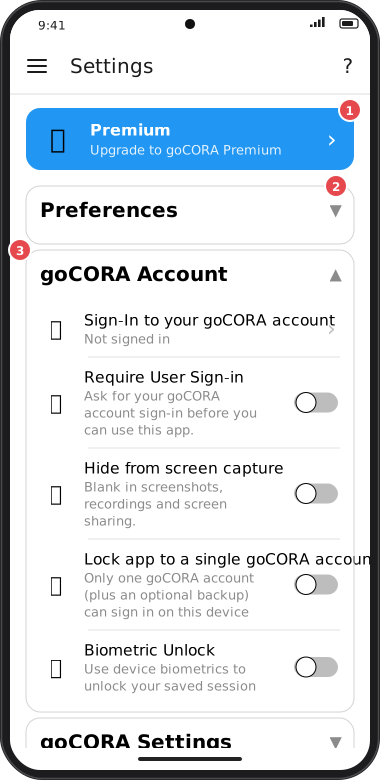
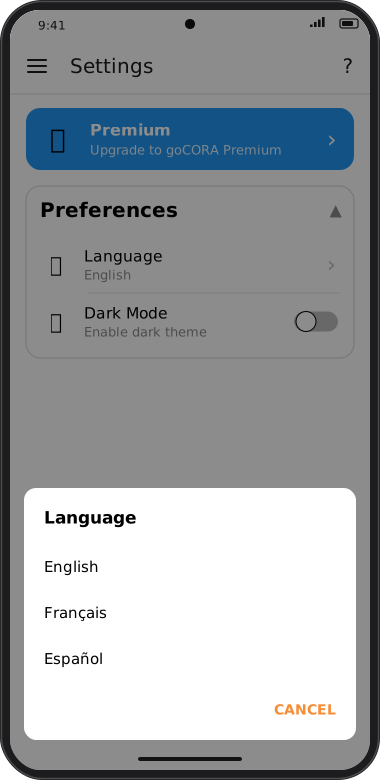
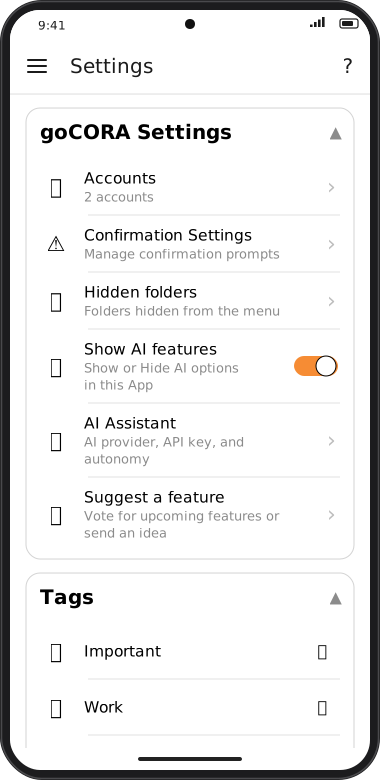
Screens are illustrated with the Android layout; Windows and iOS show the same screens with native styling. Red numbers on a picture match the numbered list or the numbers in the caption for that picture.
- 👑 Premium — see what Premium includes and upgrade. Shows Premium active ✓ once unlocked. See Premium.
- Section headings — tap to expand ▲ or collapse ▼.
- goCORA Account — always open; covers your goCORA sign-in and app security (below).
Preferences
- 🌐 Language — English, Français or Español. The app switches language straight away.
- 🌙 Dark Mode — on for the dark theme; off to follow your device's theme.
goCORA Account
- 🪪 Sign-In to your goCORA account / Manage your goCORA account — see Managing your goCORA account.
- 🔐 Require User Sign-in and 🔓 Biometric Unlock — see Require sign-in & biometric unlock.
- 🕶️ Hide from screen capture (Android and Windows) — shows goCORA as blank to screenshots, screen recording, screen sharing and to apps or AI agents that capture the screen. See How goCORA protects your data.
- 🔒 Lock app to a single goCORA account and 🔑 The goCORA Backup account — see Locking goCORA to one account.
goCORA Settings
- 👤 Accounts — opens a menu: Open the email accounts page (Managing your mail accounts), and Backup/Restore Encryption Key and Backup/Restore Database (Backing up & restoring). Items marked 🔒 need you to sign in to your goCORA account.
- ⚠️ Confirmation Settings — see Confirmation settings.
- 🙈 Hidden folders — see Folders & hidden folders.
- 👁️ Show AI features — show or hide every AI option in the app.
- ✨ AI Assistant — see AI Assistant settings.
- 💡 Suggest a feature — opens the Help Center page where you can vote for upcoming features or send us an idea. See Suggest a feature.
Tags
Create, edit and delete message tags — see Tags.
CORA Security
Options for goCORA's CORA encryption — see CORA Security settings.