Confirmation settings
In the app: Settings › goCORA Settings › Confirmation Settings
Video tutorial:
Settings and confirmation prompts in goCORA
(opens in YouTube)
Open Settings › goCORA Settings › Confirmation Settings.
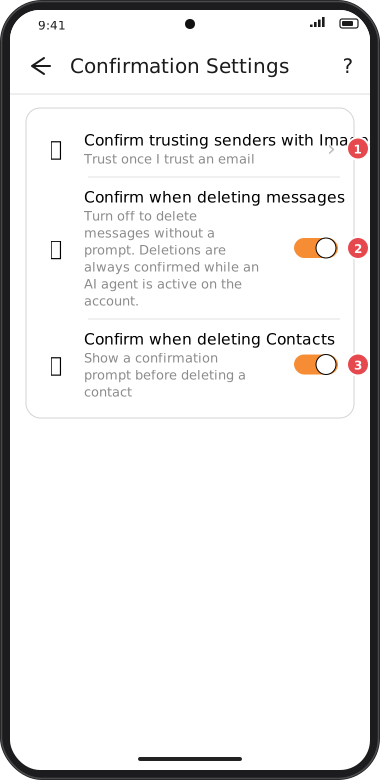
Screens are illustrated with the Android layout; Windows and iOS show the same screens with native styling. Red numbers on a picture match the numbered list or the numbers in the caption for that picture.
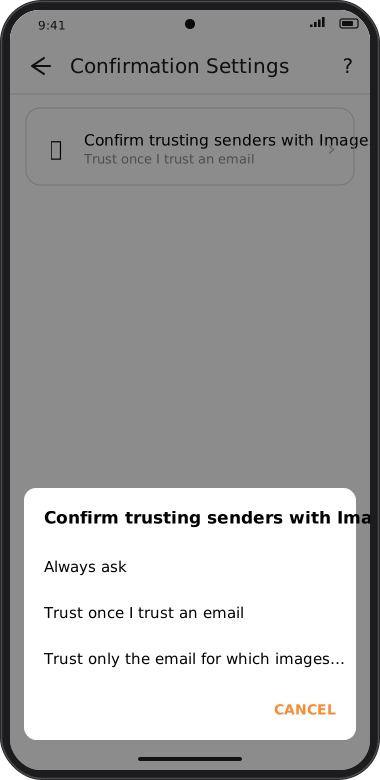
- Confirm trusting senders with Images — how goCORA remembers senders whose images you display: Always ask, Trust once I trust an email or Trust only the email for which images were downloaded. See Images & trusted senders.
- Confirm when deleting messages — on by default. Turn off to delete messages yourself without a prompt, even when AI is enabled. AI-initiated deletions still require confirmation.
- Confirm when deleting Contacts — show a confirmation before a contact is deleted.
- Confirm when sending an email — on by default. Turn off to send messages yourself without a prompt, even when AI is enabled. AI-initiated sends still require confirmation.