How goCORA protects your account data
goCORA is built with security first. Here's what that means in practice.
Your data is encrypted on your device
Mail account passwords and tokens, downloaded messages, contacts, tags and your other goCORA data are stored encrypted on your device — using goCORA's own CORA encryption — not in plain text. The key stays in your device's secure storage. See CORA Security settings.
goCORA checks itself every time it starts
Each time goCORA launches it opens its encrypted storage and checks the security keys it depends on before loading any account data.
Your mail goes straight to your provider
Extra protection you can turn on
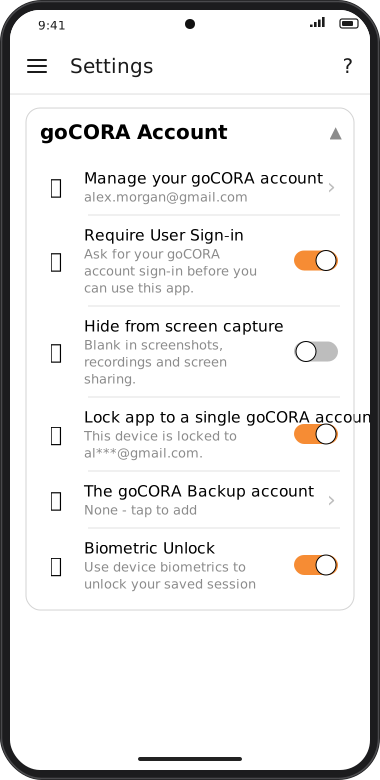
Screens are illustrated with the Android layout; Windows and iOS show the same screens with native styling. Red numbers on a picture match the numbered list or the numbers in the caption for that picture.
- Require User Sign-in and Biometric Unlock — details.
- Hide from screen capture — keeps goCORA off screenshots and screen recordings — details.
- Two-factor authentication on your goCORA account — details.
- Lock app to a single goCORA account — details.
- Blocked images so senders can't track when you read mail — details.
- Encrypted backups protected by your own PIN or password — details.
AI: on your terms
goCORA's AI is off until you turn it on, sends nothing unless you tap, and goes straight to the provider you chose. goCORA also defends you against AI used by others — scam emails, screen-reading agents and bots. See AI & your privacy.
Hide goCORA from screen capture
In Settings › goCORA Account, turn on 🕶️ Hide from screen capture. goCORA then appears blank (or black) in screenshots, screen recordings, screen sharing and the recent-apps preview — and to any app or AI agent on your device that reads the screen by capturing it.
- Android and Windows (Windows 10 version 2004 or later). iOS doesn't let apps block screenshots, so the switch isn't shown there.
- It's off by default: while it's on you can't take your own screenshots of goCORA, and goCORA shows as black when you share your screen in a video call.
- It can't stop someone photographing your screen, or an app that reads the screen through the device's accessibility features. Only install apps you trust, and only grant accessibility access to apps you trust.
App passwords, not your main password
Where possible, use a provider-issued app password rather than your main account password — see Gmail / IMAP with an app password.