Premium, ads & subscriptions
In the app: Settings › 👑 Premium · Upgrade on the ad banner
goCORA is free to use with a small ad banner at the bottom of some screens. Premium is a one-time purchase that removes ads and unlocks extra features. Open it from the 👑 Premium card at the top of Settings or the Upgrade button on the ad banner.
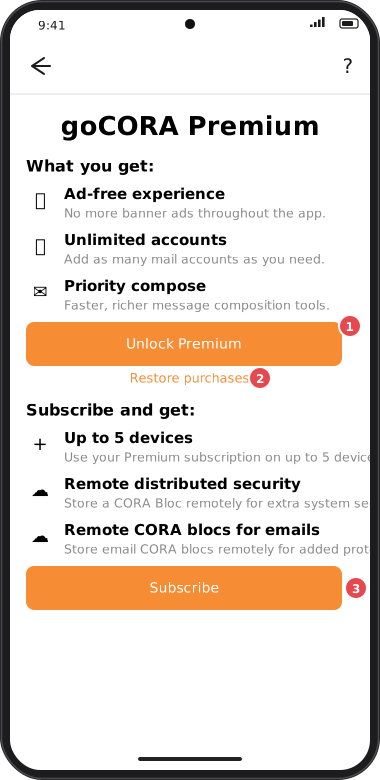
Screens are illustrated with the Android layout; Windows and iOS show the same screens with native styling. Red numbers on a picture match the numbered list or the numbers in the caption for that picture.
- Unlock Premium — buy Premium through your device's store (App Store, Google Play or Microsoft Store). The button shows the price in your currency. Premium includes an ad-free experience, unlimited mail accounts, priority compose tools, unlimited secure emails from this device (without Premium: 5 a month per goCORA account), and locking goCORA to your account with a backup account.
- Restore purchases — on a new device or after reinstalling, restores Premium bought with the same store account.
- Subscribe — a subscription (use Premium on up to 5 devices, remote distributed security and remote CORA blocs for emails) is coming soon.
Messages you might see
- Your payment is pending — Premium unlocks as soon as the store confirms the payment.
- Can't reach the store right now — check your connection and try again.
- No previous Premium purchase was found — make sure you're signed in to the same store account you bought with.
Once Premium is active, the Settings card shows Premium active ✓.