Creating a new goCORA account
In the app: Settings › goCORA Account › Sign-In to your goCORA account › Create account
Your goCORA account is separate from the email accounts you add to goCORA. It's optional for everyday email, and unlocks Premium, backup & restore, the AI Assistant and extra sign-in security.
Already created your goCORA account online at gocora.com? You don't need to create it again —
just sign in with the same email address and password (step 1 below, then Sign in).
Creating your account in the app
- Open Settings › goCORA Account › Sign-In to your goCORA account.
- Enter your email address and a password of at least 8 characters.
- Select Create account.
- goCORA emails you a verification link — open it to verify your address. (Some features, such as backups and two-factor authentication, need a verified email.)
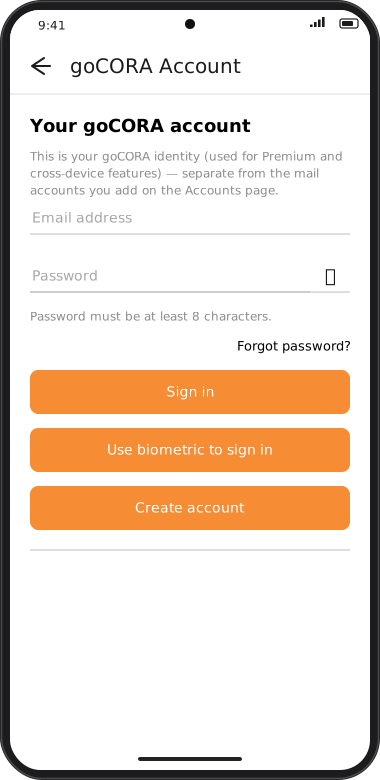
Screens are illustrated with the Android layout; Windows and iOS show the same screens with native styling.
Want goCORA to ask for sign-in every time it starts? Turn on Require User Sign-in —
see Require sign-in & biometric unlock.
Next steps
Signing in, forgot password, changing your password, two-factor authentication, signing out and deleting your account are all covered in Managing your goCORA account.