Several goCORA accounts on one device
In the app: Settings › goCORA Account
A family tablet, a shared office PC, or your own work and personal goCORA accounts: goCORA keeps what belongs to each goCORA account apart, even on the same device. Signing in with one account never shows, changes or syncs another account's mail accounts, contacts or settings.
Only one goCORA account is used at a time. To keep a device for your account alone, see Allowing only one goCORA account.
Whose items are whose
- Your items: mail accounts, contacts, tags, blocked and trusted senders, recent recipients, secure email keys and AI data added while you're signed in to goCORA belong to your goCORA account.
- Items without a goCORA account: anything added while no one is signed in (for example by someone using goCORA without a goCORA account). Everyone using the device sees them.
- Your settings belong to your goCORA account too: theme, language, confirmations, tips, AI settings and keys, Require User Sign-in, the lock timer and the other security settings. Settings used before anyone signs in come from the last goCORA account that signed in on the device.
- Kept per device: Premium bought in a store, window size, notification permission, Lock app to a single goCORA account, biometric unlock, and the counters that slow down wrong codes (switching accounts never resets them).
What you see
- Signed in: your items, plus the items without a goCORA account.
- Signed out: the items without a goCORA account, plus the last signed-in account's items, unless that account turned on Hide my mail accounts when signed out.
- Other goCORA accounts' items are never shown, and nothing you do changes them.
Hide my mail accounts when signed out
In Settings › goCORA Account, under Require User Sign-in (shown while you're signed in). Turned on, while no one is signed in your mail accounts, contacts and other items are hidden on this device. It's set for your goCORA account on this device only, and is off unless you turn it on.
When goCORA starts and some goCORA account's mail accounts are hidden, it opens the goCORA sign-in with "Your mail accounts are hidden. Sign in to goCORA to see them." After you sign in you go straight to Home. If you go back instead, the Add a mail account screen shows a Hidden mail accounts? Sign in to goCORA button.
"Keep these with …?" after you sign in
If the device has items without a goCORA account when you sign in, goCORA asks Keep these with your account?
- Mail accounts are listed one by one; under Other items, contacts, tags, blocked senders and domains, trusted senders, recent recipients and secure email keys are listed as groups. Everything is ticked to start with.
- Keep ticked items: ticked items become yours, so other goCORA accounts that sign in on this device no longer see them. Unticked items stay without an account, and goCORA won't ask you about them again (new ones are asked about later).
- Not now: nothing changes; you're asked again at your next sign-in.
- Don't ask me again (for a week, a month or a year): nothing changes, and goCORA doesn't ask this goCORA account about these items on this device for that time.
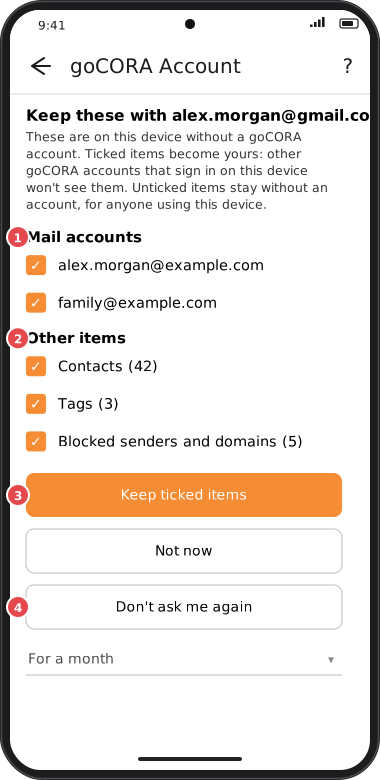
Screens are illustrated with the Android layout; Windows and iOS show the same screens with native styling. Red numbers on a picture match the numbered list or the numbers in the caption for that picture.
Why it works this way
goCORA can't tell on its own whether items added without a goCORA account are yours or someone else's on a shared device. Asking once, with everything ticked, makes keeping your own items one tap, without quietly giving anyone else's to your account.
The same mail account in two goCORA accounts
Two goCORA accounts can both use the same mail account on one device (for example a shared family address). Each goCORA account adds it normally, with its own password or its own Microsoft sign-in, and gets its own copy: its own name, server settings, password, hidden folders and folder order. If one copy breaks, the other keeps working. The downloaded mail is kept once and shared by both copies.
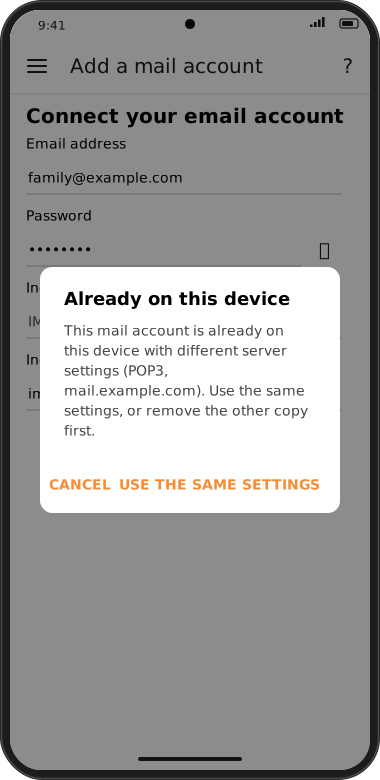
- One server per address: on one device, a mail account can only use one incoming server (name and type, IMAP or POP3). If you add it with different settings, goCORA says Already on this device: "This mail account is already on this device with different server settings (…). Use the same settings, or remove the other copy first." Use the same settings fills in the other copy's server settings (never its password or sign-in); you still enter your own password and tap Sign in. Cancel changes nothing.
- Changing the server later (for example when your provider moves) is allowed. If another copy still uses the old server, goCORA reminds you to update it too when you're signed in to that goCORA account.
- Removing it removes only your copy. Its downloaded mail stays while another copy is on the device: "Removed. Its downloaded mail stays on this device because another copy of this mail account is still here." The mail is deleted from the device with the last copy.
- Free goCORA's mailbox limit counts every mail account on the device, whichever goCORA account keeps it. The same address kept by two goCORA accounts counts once.
Why it works this way
Each goCORA account keeps its own settings and password so that one person changing or breaking a mail account doesn't affect the other. The mail is shared so it isn't downloaded and stored twice. Using one server per address keeps that shared mail consistent: mail from an IMAP server and from a POP3 copy of the same address can't get mixed up in one mailbox.
Sync, backups and removing an account
- Cloud sync carries only your goCORA account's items. Items without a goCORA account and other accounts' items are never sent to your cloud.
- Backups: a local backup holds your items, and asks whether to include the items without a goCORA account; an online backup never includes them. Restoring puts the backup's items with the goCORA account that restores it.
- Deleting your goCORA account leaves your items on the device without a goCORA account, unless you choose to erase them. Other accounts' items are never touched.
- Erase goCORA from this device offers Only my goCORA data on this device or Everything on this device when the device holds more than your items.