POP3 accounts
POP3 is an older protocol supported for accounts that don't offer IMAP. Unlike IMAP, POP3 typically downloads messages to a single device and doesn't keep folders or read/unread status in sync across multiple devices or apps.
If your provider supports IMAP, we recommend using
Generic IMAP or Gmail / IMAP
instead — see Which account type do I need?
Steps
- In goCORA, go to ☰ › Accounts › Add account.
- Set Incoming Protocol to POP3.
- Enter your display name and email address.
- Enter the incoming (POP3) server, typically port 995 (SSL) or 110 (unencrypted — not recommended).
- Enter the outgoing (SMTP) server details.
- Enter your password and select Sign in.
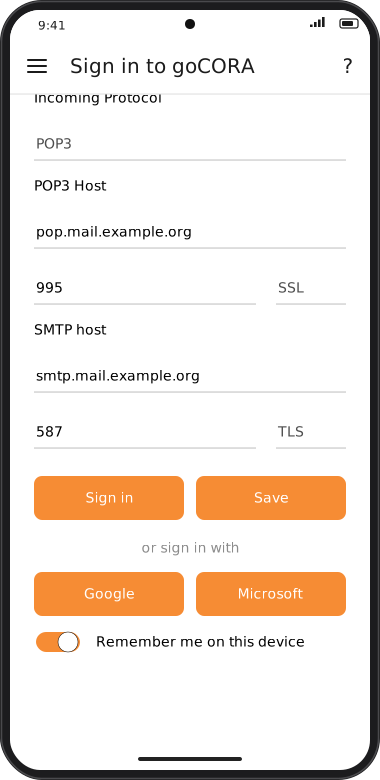
Screens are illustrated with the Android layout; Windows and iOS show the same screens with native styling. Red numbers on a picture match the numbered list or the numbers in the caption for that picture.
Things to know
- Messages downloaded via POP3 may be removed from the server, depending on your provider's settings.
- Folders other than the inbox are usually not visible.
- If you use goCORA on more than one device, POP3 mailboxes can appear inconsistent between them.