Generic IMAP account
Video tutorial:
Connect Outlook and other providers to goCORA
(opens in YouTube)
If your provider isn't Gmail, you can add any IMAP account manually by entering its server settings. Check with your email provider for the exact values if you don't already know them.
What you'll need
| Field | Typical value |
|---|---|
| Incoming server (IMAP) | e.g. imap.yourprovider.com |
| IMAP port | 993 (SSL) or 143 (STARTTLS) |
| Outgoing server (SMTP) | e.g. smtp.yourprovider.com |
| SMTP port | 465 (SSL) or 587 (TLS) |
| Username | usually your full email address |
| Password | your account password or app-specific password |
Steps
- In goCORA, go to ☰ › Accounts › Add account.
- Leave Provider preset on Custom (or pick your provider if listed) and keep Incoming Protocol on IMAP.
- Enter your display name and email address.
- Enter the incoming (IMAP) and outgoing (SMTP) server details from the table above.
- Select the appropriate security setting (SSL or TLS) for each server.
- Enter your password and select Sign in to test and connect. Every field is explained in The “Connect your email account” screen.
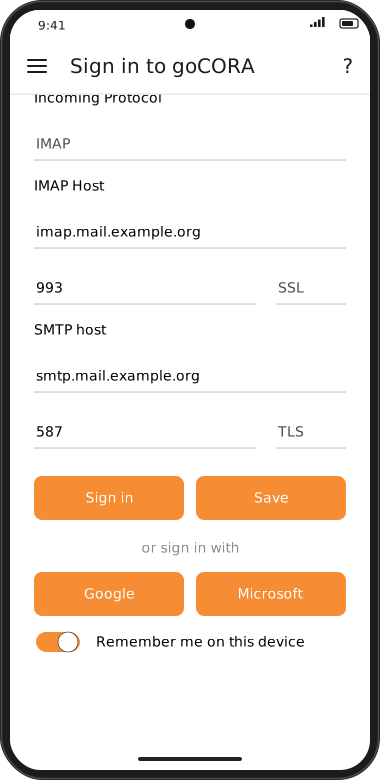
Screens are illustrated with the Android layout; Windows and iOS show the same screens with native styling. Red numbers on a picture match the numbered list or the numbers in the caption for that picture.
If goCORA reports a connection error, double-check the server addresses and ports with your provider,
and confirm the security (SSL/TLS) setting matches what they require.