Re-authenticating an account
In the app: ☰ › Accounts › tap the account
Video tutorial:
Fix sync and reconnect email in goCORA
(opens in YouTube)
If you changed your email password, revoked an app password, or goCORA reports that sign-in failed for an account, update the account's details.
Password or app-password accounts
- Open ☰ › Accounts.
- Tap the account's name.
- Enter the new password or app password (tap 👁 to check what you typed).
- Select Sign in — goCORA tests the connection and reports which server fails, if any.
Microsoft accounts
An Outlook/Microsoft 365 account that needs attention shows a Sign in button on the Accounts screen. Tap it and sign in on Microsoft's page.
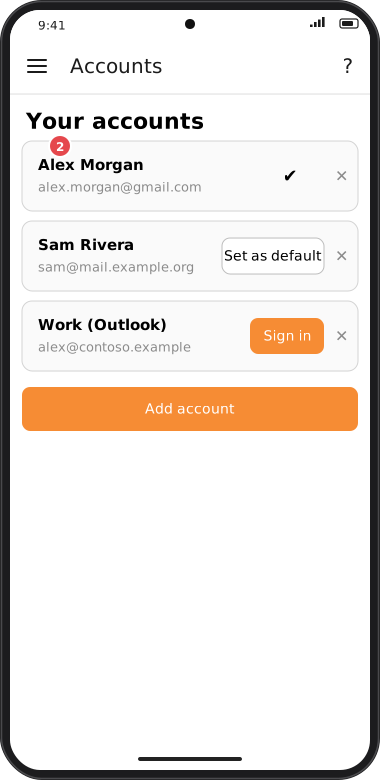
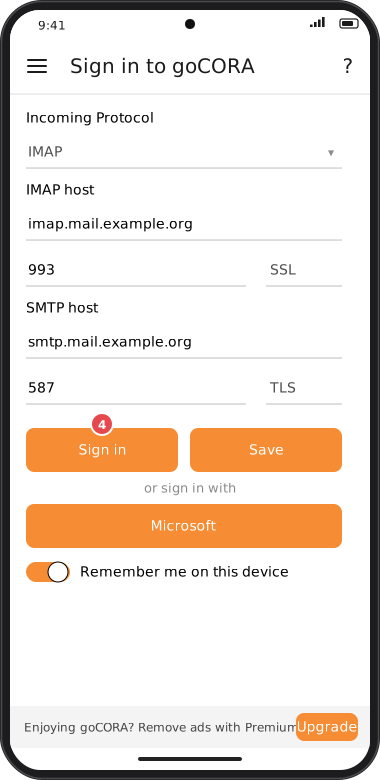
Screens are illustrated with the Android layout; Windows and iOS show the same screens with native styling. Red numbers on a picture match the numbered list or the numbers in the caption for that picture.
If you use an app password (for example with Gmail), you may need to create a new one first — see
Gmail / IMAP with an app password. Accounts added earlier with Google sign-in
must be removed and added again with an app password.
Still failing to connect?
- Double-check the server names, ports and SSL/TLS choices — see The “Connect your email account” screen.
- Confirm your provider hasn't blocked the sign-in (some providers flag new sign-ins for review).