

goCORA

iPicPass

About


Options

The Fortress

  • Save your passwords, banking information, user names, notes ... each in its own Vault.
  • Make connections between Vaults. Connections allow you to jump from one vault to another; use your own logic and associations to jump between vaults.
  • The Fortress is Safe and secure, at both the front end where you the user signs in (using iPicPass), and at the backend where your data is stored (using CORA).
  • Sign in (authenticate) with iPicPass; use your own pictures and markers (gestures) to sign in.
  • Passwords are optional and don't have to be cryptic - you can choose any password that makes sense to you.
  • The complexity of your authentication is found in the visual cues and combinations of gestures (and/or passwords) rather than being forced to use 7 upper case, 5 lower case, 2 numbers and 3 special characters.
  • Backup your data locally or online using our Context Ordered Replacement Algorithm (CORA). More information is available in the iPicPass navigational placard in the upper left hand corner of this page.
    • You can save the data files and data key locally on your computer.
    • You can save the data files globally on 1 or more servers, and keep the data key local on your computer or usb.
    • You can save everything globally on multiple servers.
    • You can save one data file locally on your computer or usb, and the rest on 1 or more servers.
  • Use Keywords to organize your Vaults.
  • Connections and keywords make finding your information fast, intuitive and easy.
  • Search by keyword and/or phrases.
  • Filter results by your search criteria.
The Lock icon is used to either:
  • Lock your Fortress.
  • Display iPicPass without locking iPicPass and your Fortress.
The Delete icon is used to delete the selected Vault.

A vault is selected when its background colour is hilited (yellow).

The Connection icon visually tells you that there is a connection associated with this icon.
The Empty Connection icon and the Connection icon can be used to add a connection by dragging it to the right, and then over another Connection icon in another vault.
Vault markers are found at the left edge of each row. Vault markers provide visual feedback to the user as shown in the following diagram:

Vault markers can also be used to instantly edit a Vault by clicking on it with a mouse or tapping on it with your finger on a mobile device.

Secure Backup

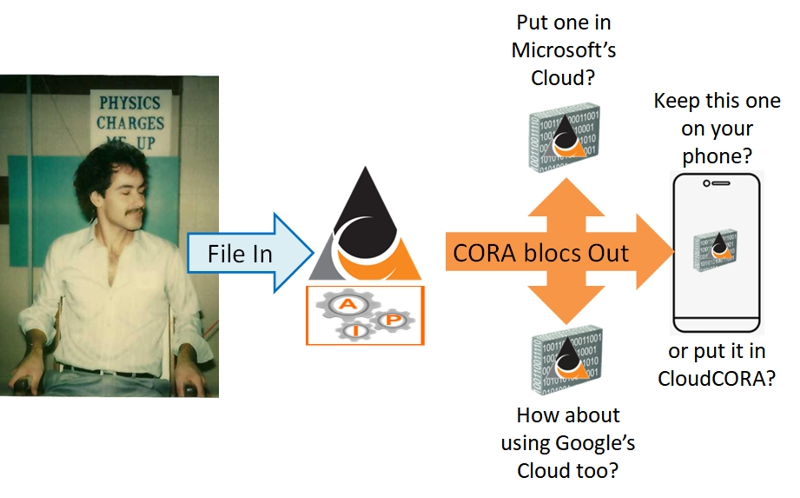
CORA translates your data into a stream of data that is then separated based upon its context and separation paramters into different files that may then be stored separately to insure the security of your data, even if someone should hack into a computer and steal a file.

You may imagine that your data is like the characters in a book. Someone comes along and takes out the characters in a seemingly random order and puts half the characters in one bag, then the other half the characters into a second bag (2 backup files).

Should someone break into your home and steel one of these bags, they would never be able to put them together again to form the original book.

They would have to steel both bags, and then the particular "key" (context/pattern) that was used to separate the characters.

If your bags where securely stored in separate (and unknown) locations, and the context in another location, then it becomes virtually impossible to steal this "book".

The # of backup files is like the number of bags in the previous analogy; this will be how many different files your data is broken up into.

Each of these data files requires the context and data keys to recreate the original data. Each file by itself is unreadable and cannot generate your original data.

The # of textarea(s) allows you to store your data files locally on your computer or usb device(s). If you don't wish to have your data out of your safekeeping then you may choose to have your data placed into these files.

These textareas will have to be copied and pasted to your own files (you could paste them into a word processor or text file using a program such as notepad.

You would be responsible for recording the date and time of each file, and the relationship to other files (names, dates, times) so that you would be able to restore your data when necessary.

A much better option would be for you to store some data files globally on multiple servers, and if you are concerned, store one piece of data and/or the data key locally.

It should be noted that CORA stores your data on separate servers belonging to separate server spaces. This makes it virtually impossible for a hacker or thief to steal all of the pieces to your puzzle.

Even should someone accomplish this, they would still have to obtain your "client Key".

If this "remote possibility" still concerns you, then you may keep one data file, and/or the data key locally where you can hold on to it.

iPicPass

Security

Usability

Control

Visual

Complex

Senerio #1 - profile 1

Senerio #2 - profile 2

CORA (Context Ordered Replacement Algorithm)

Safe and Secure

CORA - the need

CORA - the solution

CORA - your options

CORA - the analogy

CORA - tell me more
    There are 4 key aspects to CORA included in this release of iPicPass.
  1. A unique client Key that is produced when you register for the free version or purchase a mobile license.
  2. A unique data Key that is created when you initiate a backup of your data.
  3. Two or more data files are used to hold the context ordered replacement fragments.
  4. You may choose to keep your files locally on your own, or store them centrally on different servers.

Context Ordered Replacement Algorithm (CORA) is ideally suited to the Global Online community.

By its very nature, CORA protects against a thief/hacker acquiring your data even if they successfully comprimise your online security.

CORA maps your data to different files which are best kept on different storage media, such as on different servers on different networks.

CORA is capable of optimizing corporate security by shielding key elements of the context mappings on a device or network that in a strickly inaccessible (offline).

CORA

The following samples illustrate the types of output obtained with CORA as of this introductory version.

This is a sample client Key: Ÿ老Ӷ㨁仃肐䝜䠬䇶盚慼ⶦʝ擊ഇ㕒҅慤緉㢄㚞湇䧈寉┨ఢⱀ

Data Keys are uniquely generated every time CORA is used. The following are samples of data Keys:
Tue Jul 26 22:12:14 EDT 2011|4767,26,0,2,|3|2|8|16|2929,2198
Tue Jul 26 22:12:36 EDT 2011|4767,26,0,3,|3|3|8|16|2196,1466,1465
Wed Jul 27 05:40:29 EDT 2011|1253,26,0,2,|3|2|31|16|787,592
Sun Jul 31 09:24:00 EDT 2011|4767,26,0,3,|3|3|8|16|2196,1466,1465
Sun Jul 31 09:25:05 EDT 2011|1253,26,0,3,|3|3|31|16|590,395,394

The following are examples of data Files that are generated and presented to the user to store locally.

This is an example of one data File being saved at the client and the second data file being saved at the server. Notice that the data Key is also saved at the client.

The second data file has been saved remotely at one of two servers that are located on different networks.
This is an example of two data Files being saved at the client.
Contact
PhotoPassword.com

PhotoPassword is a visual, photo (picture or graphic) based password authentication service available for browsers that are running on a computer.

For more information about how PhotoPassword authentication works, please select iPicPass in the navigation placard in the upper left hand corner of this page.

Developers and website owners interested in using PhotoPassword to authenticate websites that are viewed in a browser should use this website for their inquiries, technical support and product development.

iPicPass.com

iPicPass is a visual, picture based password authentication service.

iPicPass.com is the website dedicated to mobile devices. While the base code set for mobile devices and browser based computers is the same, there are subtle difference in the immplementation of iPicPass technology on a mobile device.

Developers who are targetting mobile devices should focus their attention to iPicPass.com.

Users who are using iPicPass technology on mobile devices should visit iPicPass.com for more information or assistance.

goCORA.com

CORA (Context Ordered Replacement Algorithm) securely stores your data in separate files using multiple keys. Each file is a subset of the original data that separated by context and stored separately.

Should a thief or hacker successfully break in and steal fragments of the data, your data would remain secure unless they successfully comprimised multiple servers, encryptions and/or physical devices.

goCORA.com stands for Global Online CORA. While CORA can be used in a static environment such as on a single computer or mobile device, it is most naturally designed for use in a Global Online environment in which your data is both portable and safe!

One would expect that a static environment should be secure; in all cases CORA is useful in securing your data "even if" a thief where to break in and access your file(s).

It is for this reason, to secure your data wether it is local or globally accessible, that goCORA.com has been named and created.

goCORA is a subsiduary of pieV.com which is a sole proprietorship located in Windsor, Ontario Canada.

goCORA is currently seeking affiliations with computer professionals and/or corporations who are interested in porting this technology to a static environment used by standalone operating systems and application software.

Font Size
Set the font size for regular content being viewed within PhotoPassword.com.
Largest: 16 point.
Large: 14 point.
Normal: 12 point (default).
Small: 10 point.
Font Colour
Set the font colour for regular content being viewed within PhotoPassword.com.
Brown (default).
White.
Egg Shell.